Sell it, build it, service it.
One record runs it all.
The lead you capture becomes the design you sell, the project your crew installs, the system you monitor and the referral that starts the next one. Nothing is re-keyed between tools. Start with the stage that costs you the most time.
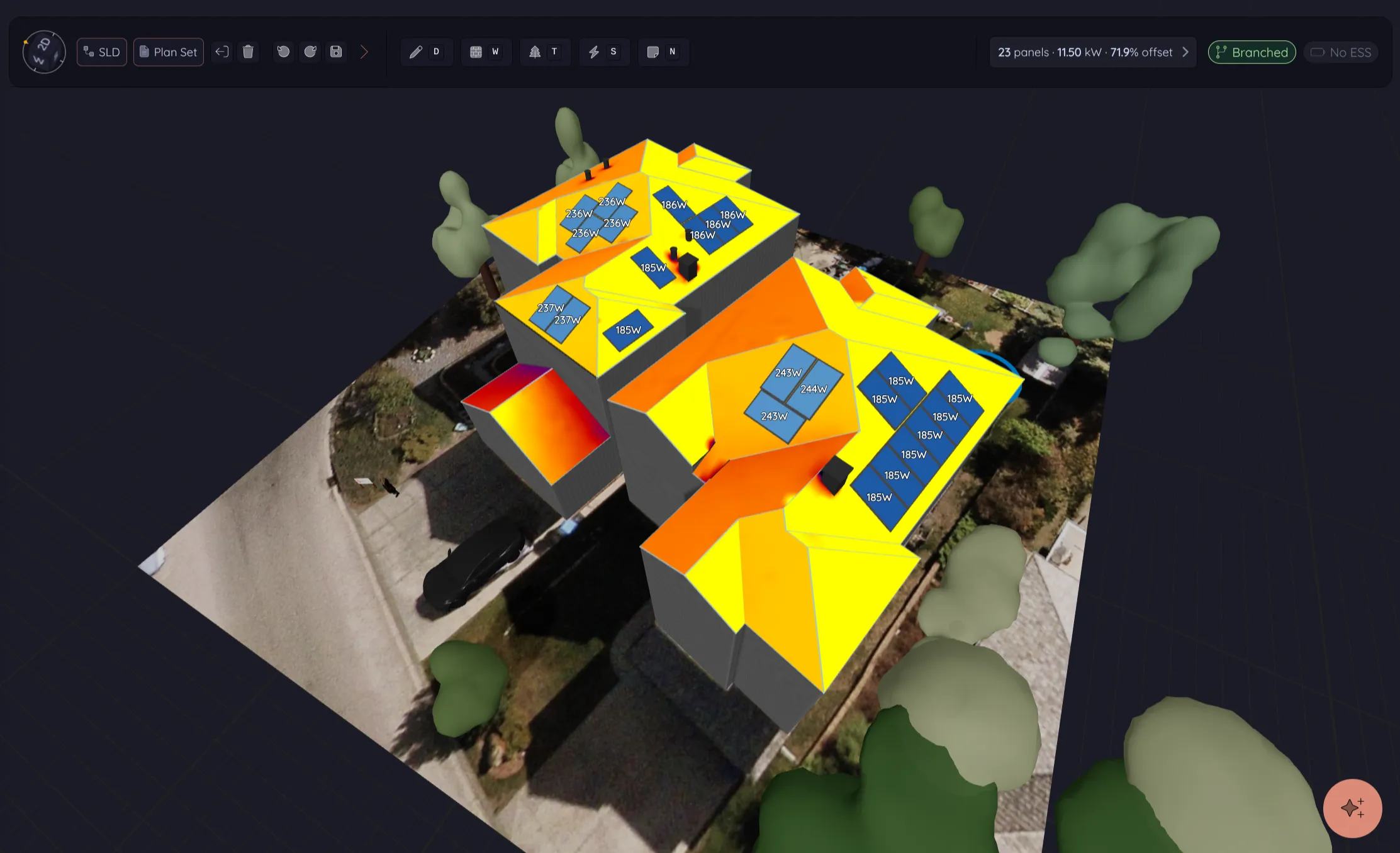
Draw the roof once.
The paperwork reads from it.
The same model carries the equipment, the hour-by-hour production and the price into the proposal, then into the invoice and, on Pro, the single-line diagram and the plan set. Nobody redraws the roof for the permit.
See design & proposals ↗Model every panel. Sell on real numbers.
Build the 3D model on aerial imagery and send a proposal the customer signs online. The production they are signing for was simulated panel by panel on their own roof.
Design & proposals
Model the roof in 3D, simulate production for every panel across all 8,760 hours of the year and send a Live Proposal the customer signs from any device.
Drone site surveys
Upload drone photos or video and design on current site imagery and a measured 3D surface of the roof. Processing is included on Pro.
Battery analysis
Size the battery against the home’s usage and solar production, hour by hour. Choose backup, self-consumption or time-of-use operation and show the customer the result.
Equipment library & web shop
Approve a product once and its specs, price and documents travel into every design, proposal and plan set. Sell from the same catalog in a branded shop on Pro.
Electrical design
Edit a single-line diagram drawn from the strings and inverters already in your design, with conductor, overcurrent and voltage-drop checks for NEC and CEC. The designer keeps the final say.
Plan sets
Cover, site, roof, array and single-line sheets drawn from the same design, with notes, placards and revisions kept together.
Invoicing
The signed quote becomes a branded invoice, line for line. Send a secure link by email or text, record payments and track sent, viewed and paid.
Give every lead an owner. Give every job a crew.
The lead from your website or a knock on a door becomes the project your crew installs. Schedule the visit, text the customer, sign the toolbox talk and file the site photos on that same record.
CRM & workflow
Capture leads from your forms, canvassing or a CSV, route each one to an owner and move it through the stages your company defines. Automations handle the follow-up.
Lilypad
Schedules, tasks, documents and site photos on iOS, Android and iPad. Knock a door, log the result and the lead lands in the CRM, even with no signal on the street.
Field operations & Site Safety
Dispatch the crew by skills, distance and weather, then text the customer when the truck is on its way. Toolbox talks and hazard assessments are signed on site.
API & integrations
Push leads in and project events out with the Pro REST API and signed webhooks. A public OpenAPI spec and an integration brief get your developer or coding assistant started.
MCP & connected assistants
Connect the assistant your team already uses and ask it about projects, leads and today’s work. Read-only in this Pro pilot, with access you approve.
Monitor the fleet. Earn the referral.
On Pro, the installed system stays tied to its design, its customer and its message history, so a fault becomes a service call on the same record. On every plan, a happy customer carries a referral link that puts the next lead on your board.
Fleet monitoring
Enphase, SolarEdge, APsystems and Tesla Powerwall systems in one fleet view. Faults, failed syncs and zero production open incidents your team works through. Included on Pro with no per-system fee.
Client portal
Customers sign in under your logo to see progress, production, savings, documents, installation photos and messages. Standard and Pro.
Customer lifecycle
Campaigns go to live segments of your own customers. A referral through a customer’s personal link creates a lead that names the referrer and alerts your team.
Knowledge base
Write the answer once. Publish it on your website under your brand, then send the link instead of retyping the explanation.
Company websites
Run your public website on Powerlily, with pages designed around your equipment, articles and installations. Your own domain from Standard, custom pages on Pro, or keep the site you have.
Ask Pericles.
He knows your pipeline.
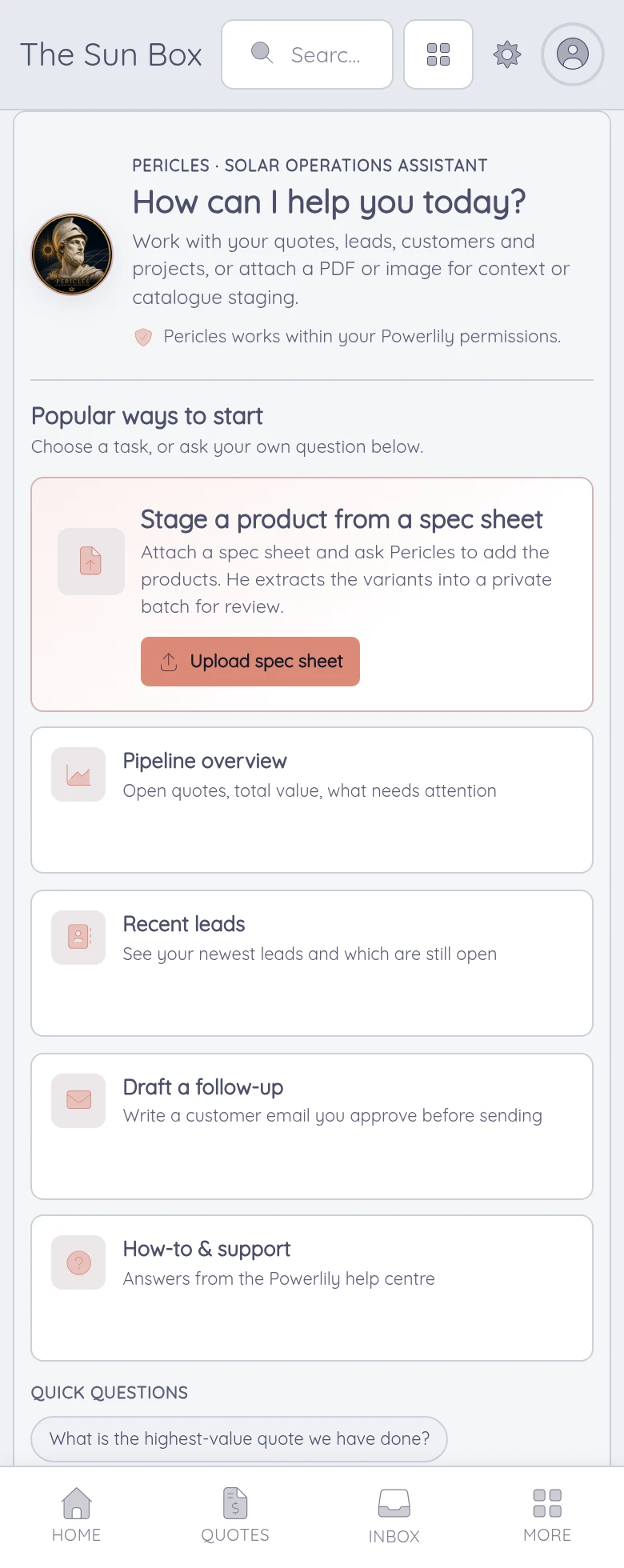
Find what is stalled in the pipeline, draft the customer follow-up or turn a spec sheet into a catalog entry for review. Pericles answers from your own records and sees only what you are allowed to see.
Pericles is included on Pro. He proposes, and your team approves.
Unlimited users, unlimited branches.
Add a setter, a designer or a second office with no enterprise upgrade or per-location fee. Plans differ in what the software does, never in headcount.
Compare the plans ↗See one project, start to finish.
We walk one project from the lead form to the signed proposal, the crew schedule and the monitored system. Bring the stage that hurts most and we start there.